Use Cases
1. Upload loan contracts after successful saving loan/ saving overdraft disbursement for ETB customers.
APIs:
- POST /int-ecm-service/v1/login
- POST /int-ecm-service/v1/document/upload
Purpose
To upload loan contracts after successful saving loan/ saving overdraft disbursement for ETB customers.
Scenario
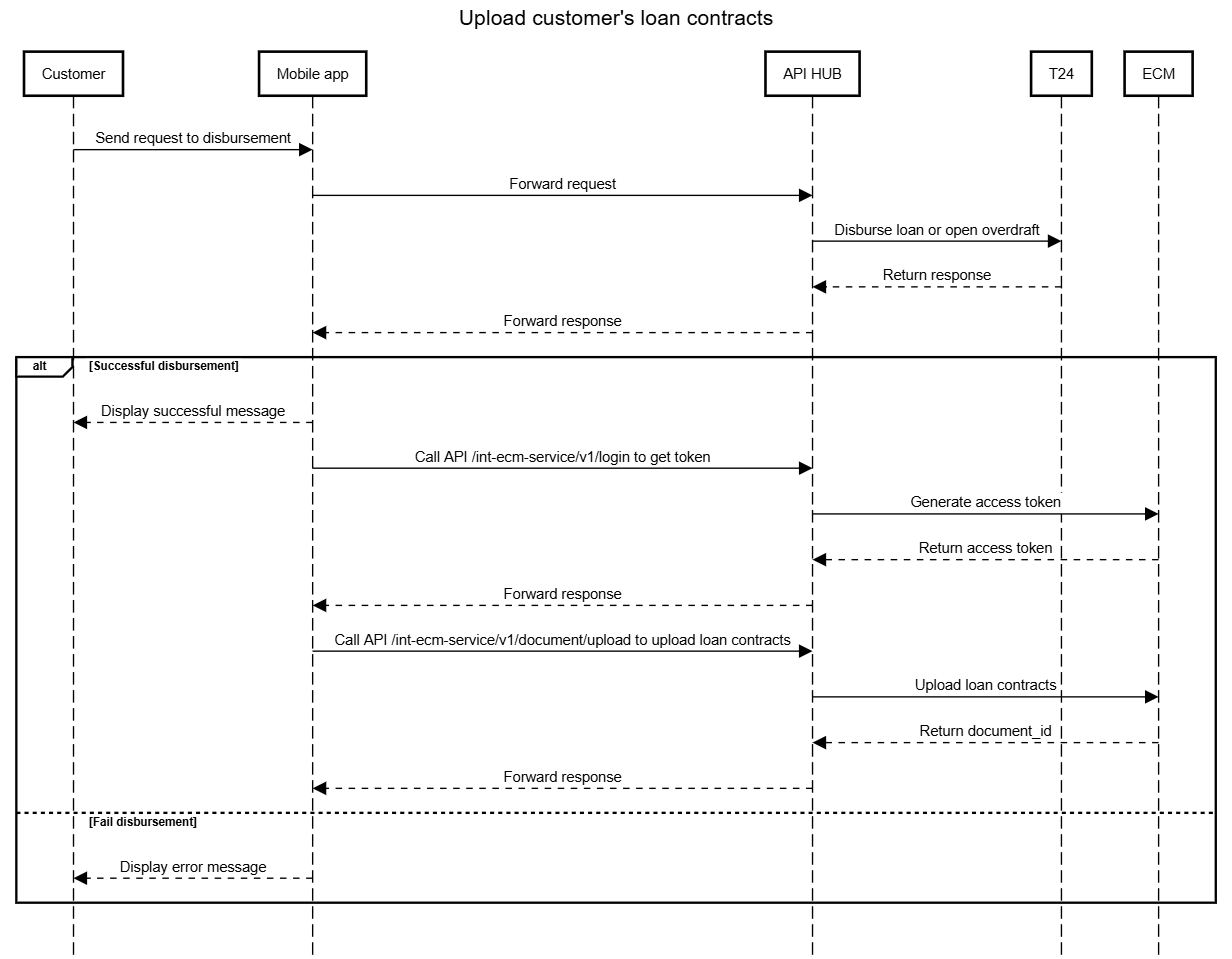
During the saving loan/ saving overdraft onboarding journey for an existing-to-bank customer, the customer signs the loan contract by using biometric check. The system then sends a request for disbursement. After successful disbursement, the system uploads the signed loan contracts to ECM.
System Action
- The channel system invokes the /int-ecm-service/v1/login API to obtain a time-limited access token.
- Only if the token is successfully returned, the channel proceeds to the next API:
- The channel system invokes the /int-ecm-service/v1/document/upload API
- For each API call, the channel system uses the access token to send a the loan contract signed by the customer along with the required metadata to ECM.
- ECM performs the following:
- Validates the request
- Stores loan contract
After each successful upload, the system receives a response containing the corresponding document ID for the stored document.
Error handling
API /int-ecm-service/v1/login
No | HTTP status code | code | Description | Resolution |
| 1 | 400 | ESB.027.02.008 | Validation errors: mandatory fields are missing, values (for example: username/password) do not exist. | Show message error defined by PO |
2 | 400 | ESB.027.01.008 | Connection error to targetService. | Show message error defined by PO |
API /int-ecm-service/v1/document/upload
No | HTTP status code | code | Description | Resolution |
| 1 | 400 | 400 | Missing required field(s).Exceeds the maximum length. Invalid value (applies to fields whose values must exist in the ECM master data). Invalid field format. | Show message error defined by PO |
| 2 | 403 | Access denied due to an invalid or expired access token. | Show message error defined by PO | |
| 3 | 401 | The Authorization header is missing | Show message error defined by PO | |
| 4 | 500 | 500 | cif_number value exceeds max length | Show message error defined by PO |
| 5 | 503 | 503 | Service unavailable. | Show message error defined by PO |
Outcome
Customer loan contracts are successfully uploaded and stored in ECM for query and audit purposes.
Benefit
- Enables secure storage of customer loan contract.
- Ensures compliance and audit traceability.
2. Download customer image for loan onboarding journey.
APIs:
- POST /int-ecm-service/v1/login
- POST /int-ecm-service/v1/document/download
Purpose
To retrieve the customer’s image from ECM and display the customer’s portrait for his/her to confirm alongwith personal data.
Scenario
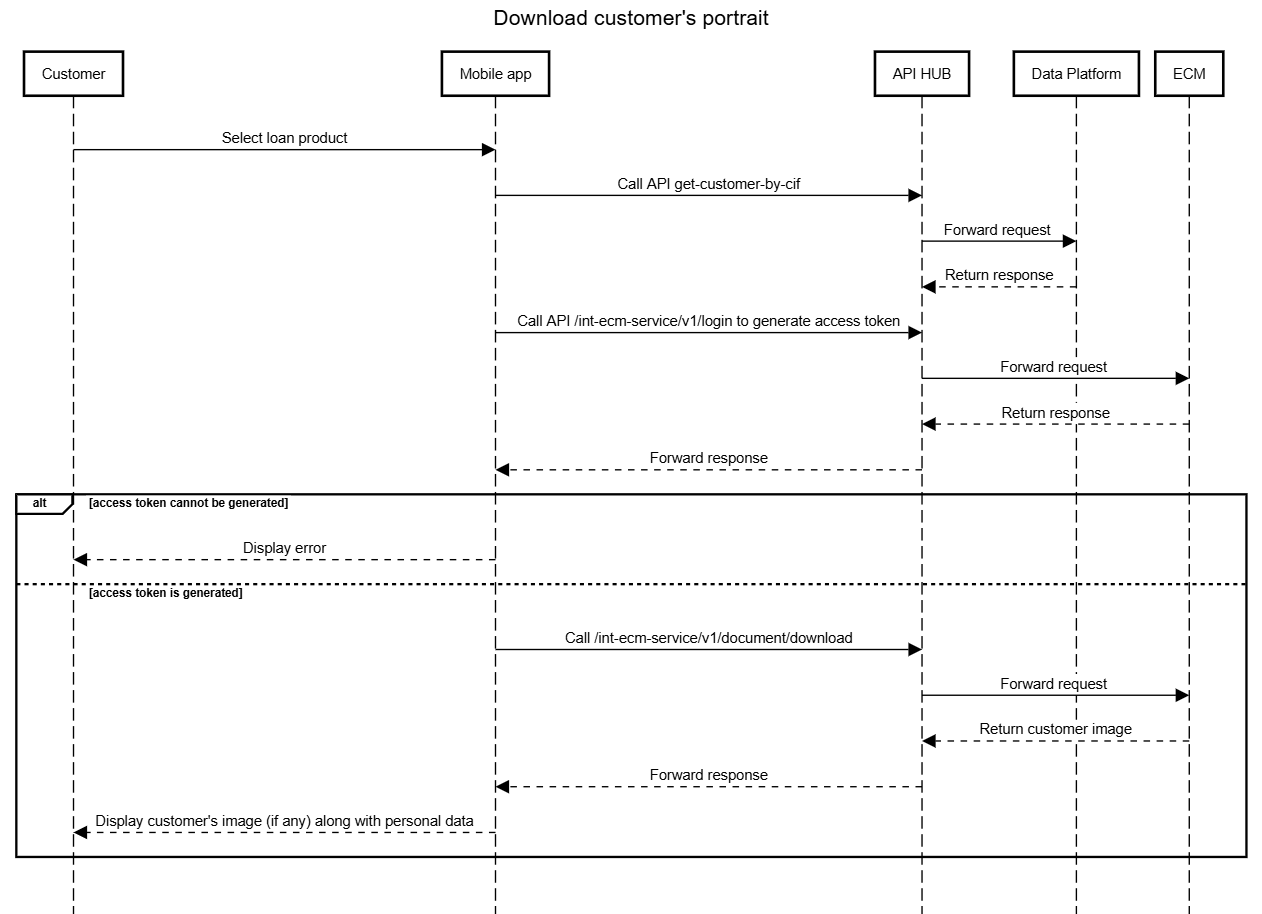
During the loan onboarding journey for an ETB customer, the system needs to display the customer’s portrait on the information confirmation screen.
System Action
- The channel system invokes the /int-ecm-service/v1/login API to obtain a time-limited access token.
- Only if the token is successfully returned, the channel proceeds to the next API:
- The channel system invokes the /int-ecm-service/v1/document/download API via the integration service using the access token and document_id to request the customer image from ECM.
- ECM validates and returns the image to the channel system.
Error handling
API /int-ecm-service/v1/login: As mentioned to section 1
API /int-ecm-service/v1/document/download
No | HTTP status code | code | Description | Resolution |
| 1 | 406 | 406 | document_id does not exist delegate_permission has no value delegate_permission is false document_id has no value | Show message error defined by PO |
2 | 400 | 400 | delegate_permission has value other than true/false | Show message error defined by PO |
4 | 500 | 500 | authorization does not exist | Show message error defined by PO |
5 | 403 | access token expired or does not exist | Show message error defined by PO | |
6 | 401 | authorization is missing | Show message error defined by PO |
Outcome
The customer image is successfully retrieved and displayed on the confirmation screen.
Benefit
- Enables seamless and secure retrieval of customer images from ECM.
- Enhances customer verification and user trust during onboarding.