Use cases
The customer service APIs automate the creation and management of individual customer records (CIFs) and accounts in T24, supporting seamless onboarding, customer data updates, and current account setup for both mobile app and in-branch scenarios.
1. Onboarding for New-To-Bank (NTB) customer
API: POST /int-esb/account-service/v1/open-combo-cif-ntb
Scenario
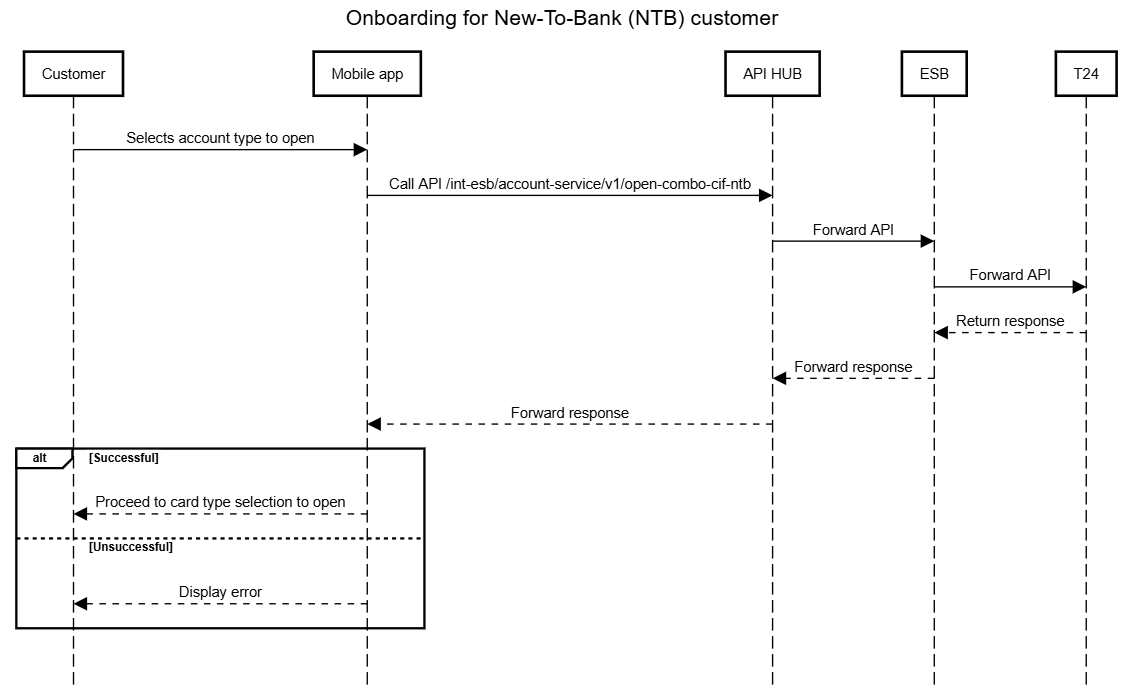
A new customer completes eKYC successfully on SuperApp and is eligible to open a CIF, current account (CASA), and IBMB account. The system needs to perform the full onboarding in a single flow.
Flow
- A new-to-bank customer completes the ekyc then selects the account type to open.
- The mobile application sends a request to the API /int-esb/account-service/v1/open-combo-cif-ntb via API HUB.
- API HUB forwards the request to ESB, and ESB forwards it to the core banking system (T24).
- The system processes the request, including CIF creation, current account (CASA) creation, and IBMB user resgistration.
- T24 returns the processing result to ESB, ESB forwards it back to API HUB, and API HUB returns the response to the mobile application.
- If the process is successful, the mobile application allows the customer to proceed to the next step (e.g., card type selection).
- If any step fails, the mobile application displays an error message to the customer.
Error handling
| No. | Code | Message | Description | Resolution |
| 1 | ESB.019.02.004 | Error in backend | For example: Mandatory fields are null legalId already exists | Display an error defined by PO |
| 2 | ESB.019.01.009 | Invalid FunctionCode | Display an error defined by PO | |
| 3 | ESB.019.01.008 | Timeout | Display an error defined by PO |
2. Enable IBMB for Existing-To-Bank (ETB) customer
API: POST /int-esb/user-service/v1/open-user-ib
Scenario:
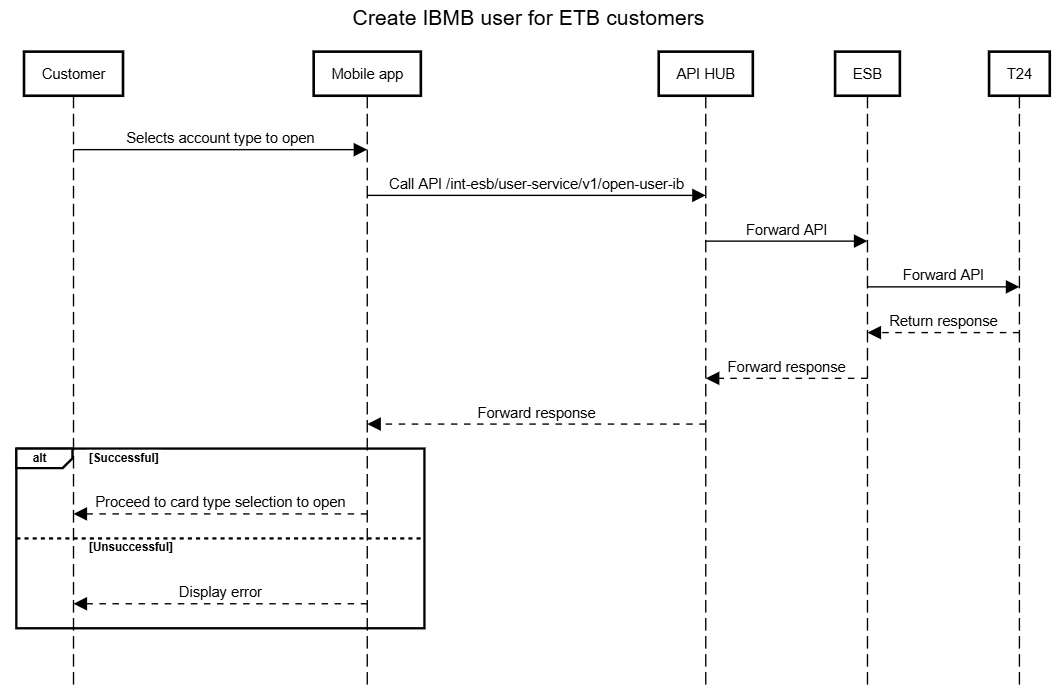
An existing customer (already has CIF) completes eKYC on SuperApp and wants to register for digital banking (IBMB).
Flow:
- The Mobile App calls the API /int-esb/user-service/v1/open-user-ib via API HUB.
- API HUB forwards the request to ESB.
- ESB forwards the request to T24 for current account (CASA) creation.
- T24 processes the request and returns the response to ESB.
- ESB sends the response back to API HUB.
- API HUB returns the response to the Mobile App.
- If the current account is successfully created, a successful screen is displayed to the customer. The customer is able to log into the app
- If the process fails, an error message is displayed to the customer.
- If the current account is successfully created, a successful screen is displayed to the customer. The customer is able to log into the app
Error handling:
| No. | Code | Message | Description | Resolution |
| 1 | ESB.019.02.004 | Error in backend | For example: Mandatory fields are null CusId already exists | Display an error defined by PO |
| 2 | ESB.019.01.009 | Invalid FunctionCode | Display an error defined by PO | |
| 3 | ESB.019.01.008 | Timeout | Display an error defined by PO |
3. Open a current account after CIF is created
API: POST /create-current-account
Scenario:
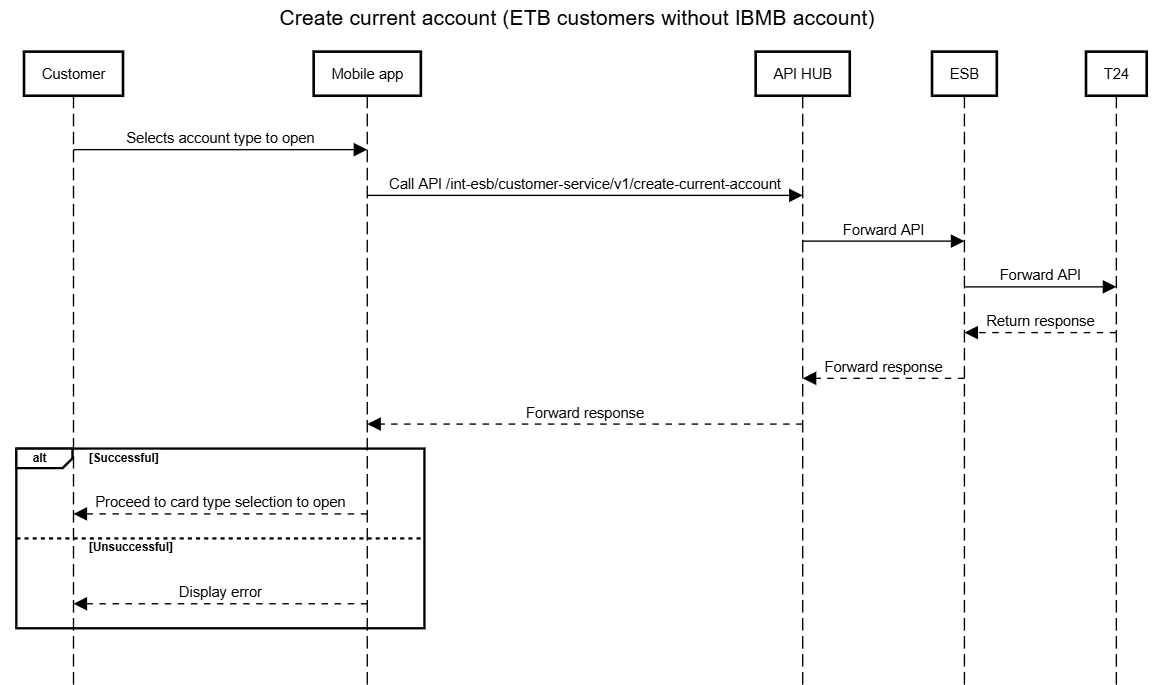
After a CIF is successfully created, the bank needs to open a current account for transactions.
Flow:
- The Mobile App calls the API /int-esb/customer-service/v1/create-current-account via API HUB.
- API HUB forwards the request to ESB.
- ESB forwards the request to T24 for current account (CASA) creation.
- T24 processes the request and returns the response to ESB.
- ESB sends the response back to API HUB.
- API HUB returns the response to the Mobile App.
- If the current account is successfully created, the customer proceeds to card type selection to continue onboarding.
- If the process fails, an error message is displayed to the customer.
Error handling:
| No. | Code | Message | Description | Resolution |
| 1 | ESB.019.02.004 | Error in backend | For example: Mandatory fields are null | Display an error defined by PO |
| 2 | ESB.019.01.009 | Invalid FunctionCode | Display an error defined by PO | |
| 3 | ESB.019.01.008 | Timeout | Display an error defined by PO |
4. Get Customer Information by Phone Number
API: GET /customer-information-by-phone-number
Scenario:
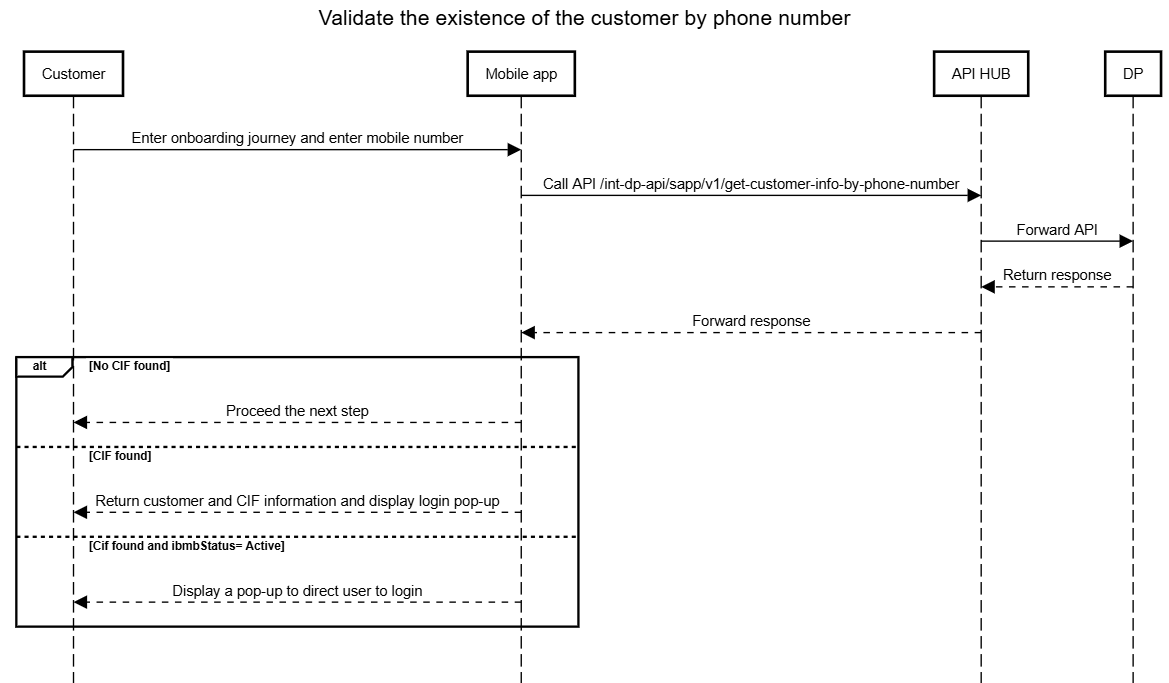
When the system receives a phone number (typically used for digital onboarding or SuperApp registration), it needs to check whether this phone number is already linked to any existing customer in NCB.
Flow:
- The system sends a request to
/customer-information-by-phone-numberwith the customer’s mobile number. - The API queries Data Platform to find if there is any IBMB account existed or any CIF associated with that phone number.
- The API returns one of the following results:
- No CIF found: Customer does not exist; proceed with new onboarding flow.
- CIF found: Return customer and CIF information; the system can suggest login instead of onboarding.
- Cif found and ibmbStatus= Active, then process the login flow, otherwise cif found and ibmbStatus= CLOSE/CLOSED/LOCK/KLOSE, then use the error DT.005.00.001 and direct customer visit a branch
Error Handling
| No. | Code | Message | Resolution |
| 1 | DT.005.00.000 | No record found | Proceed next step to allow customer onboarding |
| 2 | DT.005.00.001 | The phone number is associated with more than one person | Stop onboarding flow and inform customer to login |
| 3 | DT.005.00.401 | UNAUTHORIZED | Stop onboarding flow |
| SYSTEM_TIMEOUT | Stop onboarding flow | ||
| BAD_GATEWAY | Stop onboarding flow | ||
| 4 | DT.005.00.403 | FORBIDDEN | Stop onboarding flow |
| 5 | DT.005.00.500 | INTERNAL_SERVER_EROR | Stop onboarding flow |
5. Get Customer Information by Legal ID
API: GET /customer-information-by-legalId
Scenario:
When the system receives a Legal ID, it needs to retrieve the customer’s CIF and related information from the core banking system to verify whether the customer already exists before proceeding with onboarding.
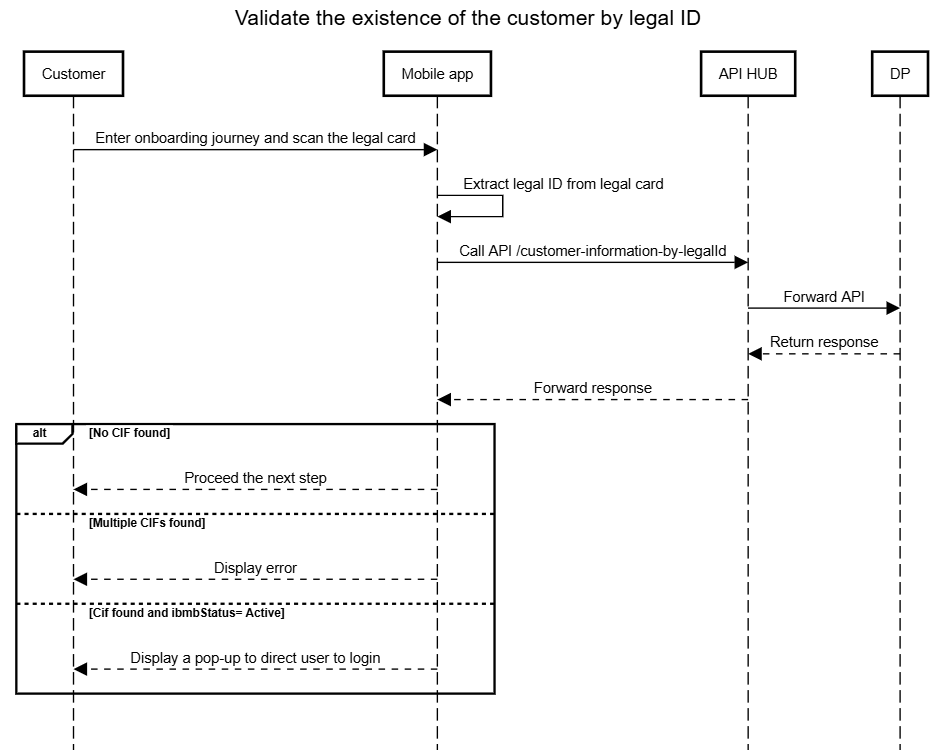
Flow:
- The system sends a request to
/customer-information-by-legalIdwith the customer’s Legal ID and Legal Type. - The API queries Data Platform to find if there is any IBMB account existed or any CIF linked with the provided Legal ID.
- The API returns one of the following results:
- No CIF found: Customer is new and can proceed with onboarding.
- One CIF found: Return CIF details for further processing.
- Multiple CIFs found: Return status indicating that multiple CIFs exist and further verification at branch level is required.
- Cif found and ibmbStatus= Active, then process the login flow, otherwise cif found and ibmbStatus= CLOSE/CLOSED/LOCK/KLOSE, then use the error DT.005.00.001 and direct customer visit a branch
Error Handling
| No. | Code | Message | Resolution |
| 1 | DT.005.00.000 | No CIF is linked with this LegalID | App proceed next step to open cif |
| 2 | DT.005.00.001 | The identification information is linked to multiple CIFs. Please visit a branch for assistance | App stop onboarding flow |
| 3 | DT.005.00.401 | UNAUTHORIZED | App stop onboarding flow |
| SYSTEM_TIMEOUT | App stop onboarding flow | ||
| BAD_GATEWAY | App stop onboarding flow | ||
| 4 | DT.005.00.403 | FORBIDDEN | App stop onboarding flow |
| 5 | DT.005.00.500 | INTERNAL_SERVER_EROR | App stop onboarding flow |
6. Get customer information by customer number
API: GET /get-customer-info-by-cif
Scenario:
When the system receives a CIF number, it needs to retrieve the customer’s information before proceeding with loan or credit card application journeys.
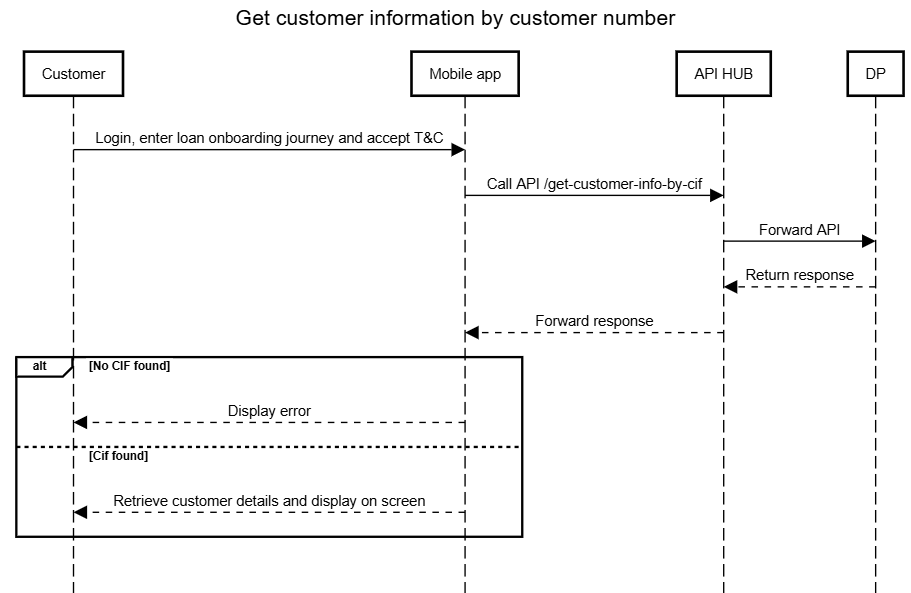
Flow:
- The system sends a request with the endpoint
/get-customer-info-by-cifwith the CIF number to NCB systems. - The API queries Data Platform to retrieve cutsomer information.
- The API returns customer information for further processing. Details include basic customer profile details (such as name, date of birth, gender,...), customer identity documents (identity number, type, issue/expiry dates, place of issue, previous identity number), contact details, and branch and relationship management information (e.g., branch code, branch name, relationship manager,...)
Error Handling
| No. | Code | Message | Resolution |
| 1 | DT.005.01.001 | CIF_NOT_FOUND | Không tìm thấy khách hàng với số CIF đã nhập No customer found with the provided CIF number |
| 2 | DT.005.01.002 | FIELD_MISSING | [field name] is missing |
| 3 | DT.005.00.401 | UNAUTHORIZED | Token or session expired Token không hợp lệ |
| 4 | DT.005.00.403 | FORBIDDEN | Access denied. You do not have permission to perform this action Không có quyền truy cập |
| 5 | DT.005.00.408 | SYSTEM_TIMEOUT | Request Timeout |
| 6 | DT.005.00.500 | INTERNAL_SERVER_EROR | Lỗi hệ thống |
7. Update employee information
API: POST /int-banking-integration-service/api/bank/v1/update-employee-status
Scenario:
During the loan onboarding journey, an existing customer logs into the Mobile App and selects employment details such as occupation and position to check AML. If the AML response is NO HIT, the customer's employment details are updated into T24.
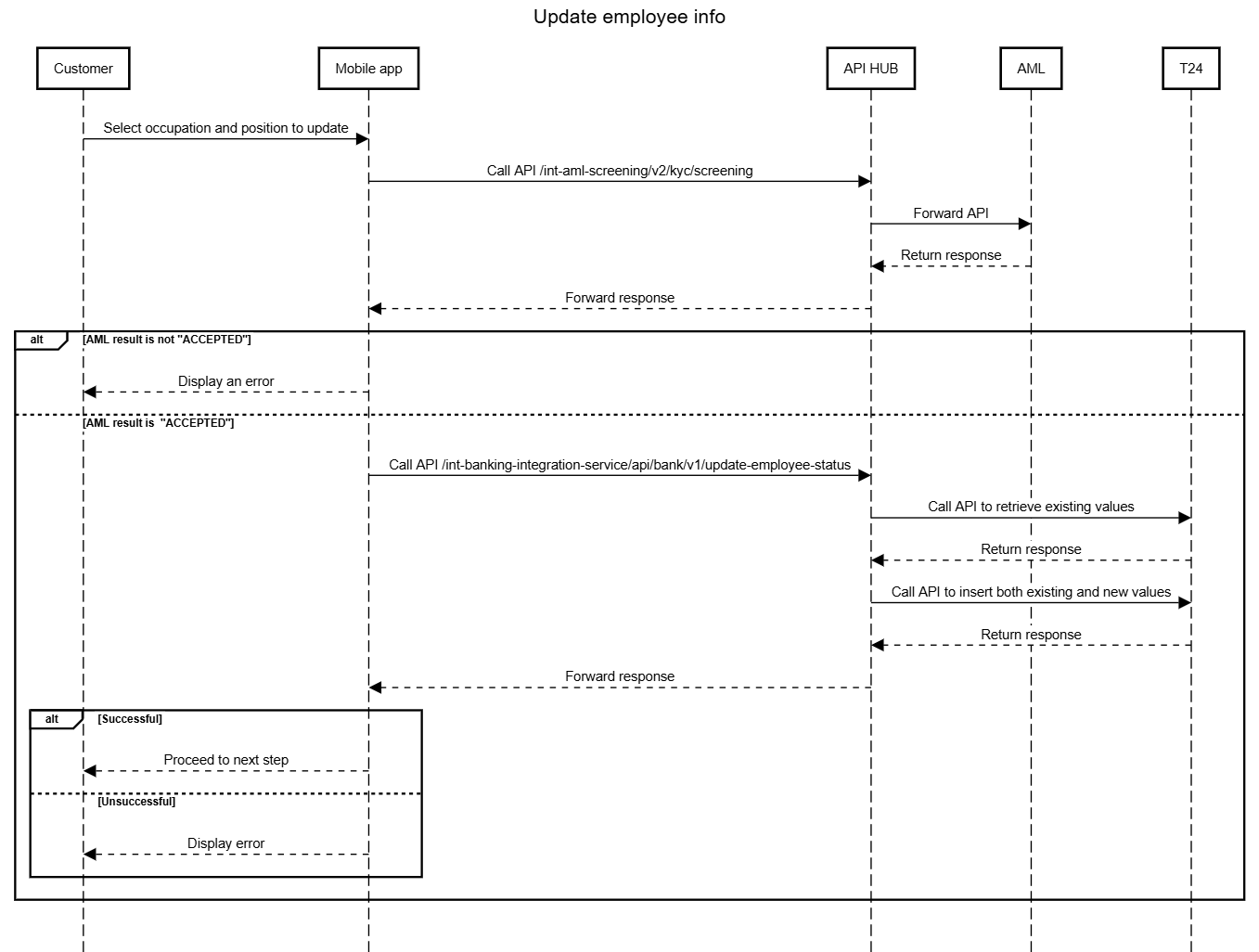
Flow:
- Customer selects occupation and position.
- The Mobile App calls /int-aml-screening/v2/kyc/screening via API HUB.
- API HUB forwards the API to AML to check blacklist/watchlist and risk rating
- If the AML result is "ACCEPTED", proceed to call API to update employment details to T24.
- If the AML result is different from "ACCEPTED", the process ends and an error is displayed to the customer.
- The Mobile App calls /int-banking-integration-service/api/bank/v1/update-employee-status via API HUB.
- API HUB first calls an internal API to retrieve the current employee information (occupation, position) of the customer from T24.
- API HUB merges the existing values with the new values selected by the customer.
- API HUB then calls T24 to update (insert) the employee information with both existing and new values.
- API HUB receives the response from T24 and forwards it to the Mobile App.
- If the update is successful, the customer proceeds to the next step of the onboarding journey.
- If the update fails, the Mobile App displays an error message.
Note:
- The retrieval of existing employee data is handled internally by API HUB and is mandatory before performing the update.
- The update request sent to T24 includes both existing and new values, as T24 overwrites all fields during update.
Error Handling
No | Error code | Description | Resolution |
1 | DT.019.02.020 | Update Cif Employee occur error | Display an error defined by PO |
2 | DT.019.02.010 | Get List Employee Status occur error | Display an error defined by PO |
3 | DT.019.01.000 | invalid method argument | Display an error defined by PO |